MapSwipe Project Types and Data Model
MapSwipe’s Crowdsourcing Approach
The MapSwipe crowdsourcing workflow is designed following an approach already presented by Albuquerque et al. (2016). The main ideas about MapSwipe’s crowdsourcing approach (and many other crowdsourcing tasks) lies in
- Defining the mapping challenge by posing a simple question (e.g. “Which areas are inhabited in South Kivu?”)
- Dividing the overall challenge into many smaller manageable components (e.g. groups and tasks based on satellite imagery tiles)
- Distributing groups and tasks to many users redundantly (e.g. every area gets mapped by at least three different users)
- Aggregating all responses (results) per task from different users to reach a final solution (e.g. by choosing the majority vote)
The MapSwipe backend now supports 7 project types. Each project type formulates a specific kind of mapping challenge — follow the links for a description, screenshot, and data model details for each one.
- Find Features
- Validate Footprints
- Compare Dates
- Assess Images
- Check Completeness
- View Streets
- Locate Objects
Data Model
This way of formulating the overall crowdsourcing challenge and it’s subcomponents shapes the data model we use.
Below you can see the structure on the example of a Find Features project type. The project manager supplies a bounding polygon, which is then divided into multiple groups, which are in turn divided into multiple tasks. Results are always bound to a task and what a result means differs by project type.
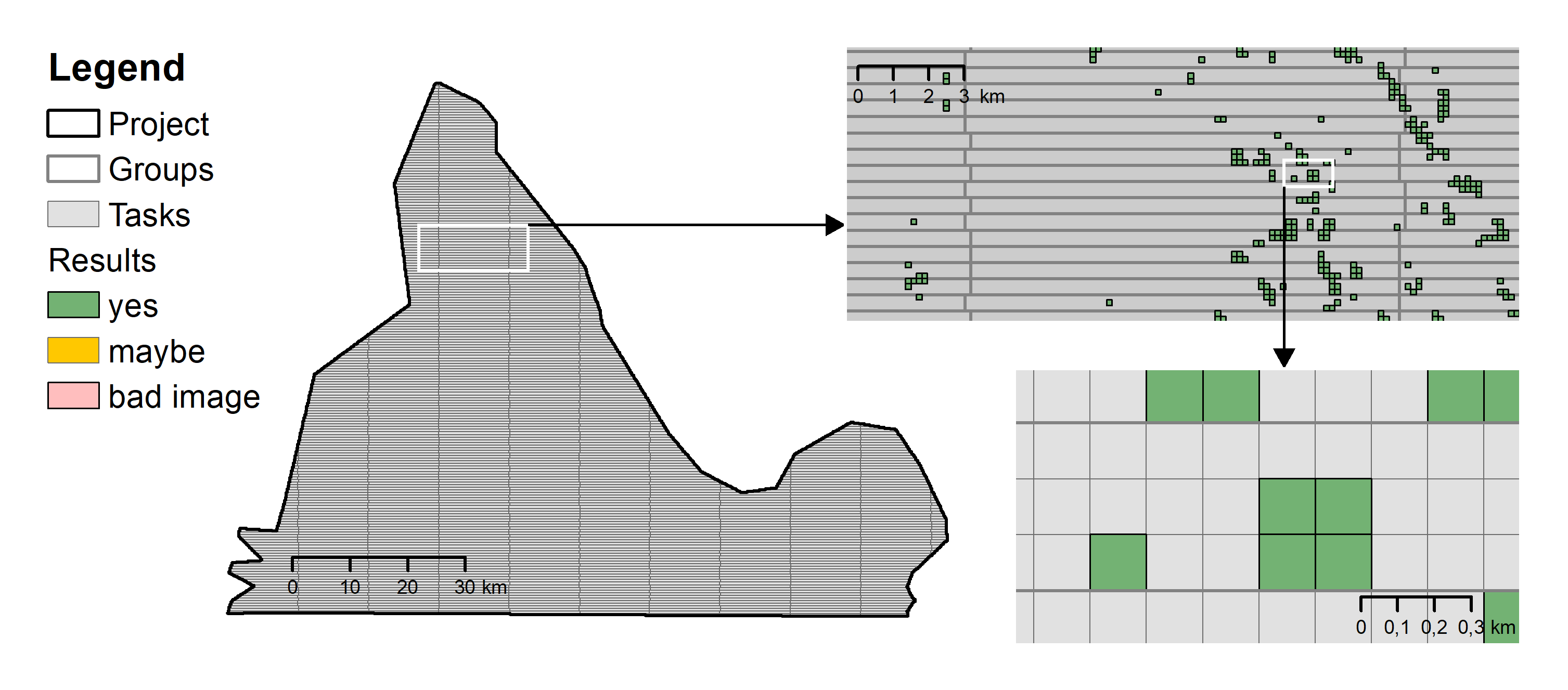
Projects
A project is the top-level unit of work in MapSwipe — what a project manager creates when they want to crowdsource a mapping challenge. It carries everything needed to present the challenge to contributors in the MapSwipe app: the area of interest, the question being asked (the lookFor), the project’s topic and region, the requesting organisation, an attached tutorial, and contributor-facing instructions. It also captures the project’s lifecycle (draft → active → finished, with team-restricted private variants) and the redundancy required before a task is treated as complete.
A project is divided into several groups, which are in turn divided into individual tasks. Aggregate fields such as progress, contributorCount, and resultCount summarise activity rolled up from the groups and results below.
| Parameter | Type | Description |
|---|---|---|
| Basic Information | ||
| projectId | string | ID of the project. |
| name | string | The name of the project (25 chars max). |
| lookFor | string (optional) | What should the users look for (e.g. buildings, cars, trees)? (15 chars max). |
| projectType | enum (int) | Identifies the project type: 1 = Find Features, 2 = Validate Footprints, 3 = Compare Dates, 4 = Check Completeness, 7 = View Streets, 9 = Locate Objects, 10 = Assess Images. See the page for each project type for the type-specific fields. |
| image | string (optional) | URL to a representative image for the project (formerly “Direct Image Link”). Make sure you have the rights to use this image; should end with .jpg or .png. |
| projectDetails | string | Description of the project (3-5 sentences). |
| projectInstruction | string (optional) | Instructions shown to the contributor during mapping. |
| projectTopic | string | Topic/theme of the project (e.g. health, disaster response). |
| projectRegion | string | Region the project covers. |
| projectNumber | int | Sequential project number assigned by the manager. |
| requestingOrganisation | string | Name of the organisation that requested the project. |
| language | string | Language code of the project’s user-facing copy. |
| manualUrl | string (optional) | URL to a manual or documentation page for contributors. |
| tutorialId | string | ID of the tutorial associated with this project. |
| teamId | string (optional) | If set, the project is restricted to members of this team. |
| maxTasksPerUser | int (optional) | Optional cap on the number of tasks a single user can map in this project. |
| verificationNumber | int | How many people should see every task before it is considered finished (default 3; more is recommended for harder tasks). |
| groupSize | int | Target number of tasks per mapping session (group). |
| groupMaxSize | int | Upper bound on tasks per group used by the grouping algorithm. |
| requiredResults | int | Total number of task-mappings required to finish the project (numberOfTasks × verificationNumber). |
| created | datetime | Timestamp when the project was created. |
| createdBy | string | User ID of the project creator. |
| status | enum (string) | One of active, inactive, private_active, private_inactive, finished, private_finished. The private_* variants restrict visibility to the team set by teamId. |
| isFeatured | bool | If true the project will appear bigger in the app. |
| progress | int | Percentage of the project’s required mappings that have been completed. Updated by the backend; not auto-updated by Firebase Cloud Functions. |
| contributorCount | int | Number of volunteers who have contributed. Updated by the backend; not auto-updated by Firebase Cloud Functions. |
| resultCount | int | Total number of task results submitted across all groups in the project. Read-only from the backend; not auto-updated by Firebase Cloud Functions. |
| numberOfTasks | int | Number of tasks in the project |
| Project Type Specific Information | There will be varying parameters defined by the individual project types. You can find this information at the page for each project type. |
Groups
The groups are an intermediary between projects and tasks. Each group belongs to a single project and consists of several tasks.
Single MapSwipe projects can contain up to several hundred thousand tasks. This can pose a challenge to fast and performant communication between clients and server if many volunteers contribute data at the same time. Therefore, groups have been introduced to reduce the amount of client requests on the backend server.
Groups consists of several tasks, that will be shown to the user in one mapping session. They are the key to distribute tasks to MapSwipe users in a way that we can ensure that everything gets mapped as often as required in an efficient manner.
| Parameter | Type | Description |
|---|---|---|
| Basic Information | ||
| groupId | string | ID of the group. |
| projectId | string | ID of the project the group belongs to. |
| numberOfTasks | int | How many tasks are in this group. |
| finishedCount | int | Once a group has been completely mapped by a volunteer the completed count of the corresponding group will be raised by one. The completed count of the group is used to assess the overall progress of each project. For doing so the completed count is compared to the redundancy required. During the mapping process groups will be served in ascending completed count order. Thus, groups with low completed count will be served first. Updated by Firebase Cloud Functions on every write to /v2/groupsUsers/{projectId}/{groupId}/; set to the number of users present under that path. |
| requiredCount | int | How many volunteers still have to map this group. Updated by Firebase Cloud Functions alongside finishedCount; computed as project.verificationNumber − finishedCount. |
| progress | int | Percentage of the group that has been mapped. Updated by the backend; not auto-updated by Firebase Cloud Functions. |
| Project Type Specific Information | There will be varying parameters defined by the individual project types. You can find this information at the page for each project type. |
Tasks
The tasks are the smallest component in our data model. Each task formulates an easy and quick to solve mapping challenge. In many cases this challenge can be put into a simple question, e.g. Can you see a building in this satellite imagery tile. Tasks always belong to a specific group and project.
Tasks are usually gzip compressed on firebase to save space. That is why this information is not readable by humans in firebase.
| Parameter | Type | Description |
|---|---|---|
| Basic Information | ||
| taskId | string | ID of the task. (Some project types use a different type — see the page for each project type.) |
| groupId | string | ID of the group the task belongs to. |
| projectId | string | ID of the project the task belongs to. |
| Project Type Specific Information | There will be varying parameters defined by the individual project types. You can find this information at the page for each project type. |
Results
The results hold the information you wanted in the very beginning. For each task you will receive several results by different users. A result is the simple answer to your initial question. For instance, it’s a simple “yes” to the question “can you see a building in this satellite imagery tile”.
A result entry is a single document at /v2/results/{projectId}/{groupId}/{userId} representing one finished mapping session — i.e. one user’s answers for all tasks in one group.
| Parameter | Type | Description |
|---|---|---|
| startTime | datetime | Client-reported time at which the user began the mapping session for the group. |
| endTime | datetime | Client-reported time at which the user finished the mapping session for the group. Together with startTime this is used by Firebase Cloud Functions to detect implausibly fast (likely spam) submissions. |
| appVersion | string | MapSwipe app version string that submitted the result (e.g. 2.2.5 (14)-dev). Submissions from older app versions without this field are discarded for some project types. |
| clientType | string (optional) | Identifier for the client that produced the result (e.g. mobile vs. web). |
| results | dict[str, int] | The user’s per-task answers, keyed by taskId. The integer encoding is project-type specific — see the relevant project type page for the value space and any deviations from this shape. |
| userGroups | dict[str, bool] | Map of non-archived user-group IDs the user belonged to at submission time. Updated by Firebase Cloud Functions on result onCreate if the user has any non-archived user groups. |
Users
The users provide the results to your tasks. They are the key to solve your mapping challenge. For each user we generate mapping related statistics, e.g. the number of projects a user has been worked on.
| Parameter | Type | Description |
|---|---|---|
| created | datetime | Timestamp when the user account was created. |
| lastAppUse | datetime (optional) | Timestamp of the user’s most recent activity in the app. |
| username | string (optional) | User-chosen display name. Changes to this field trigger a Firebase Cloud Function that queues a sync flag at /v2/updates/users/{userId} for synchronizing with PSQL database. |
| usernameKey | string (optional) | Normalized (lowercase) form of username used for lookup/uniqueness. Backfilled for existing users by a migration endpoint. |
| accessibility | bool (optional) | Per-user accessibility preference flag. |
| teamId | string (optional) | ID of the team the user belongs to, when applicable. This is the only user field that the backend is allowed to update directly. |
| userGroups | dict[str, any] (optional) | Map of user-group IDs the user belongs to. Populated by the user-group membership flow. |
| contributions | dict[str, any] (optional) | Per-project contribution record, keyed by projectId. Auto-populated by Firebase Cloud Functions on each result onCreate: sets contributions/{projectId}/{groupId} to true and increments contributions/{projectId}/taskContributionCount by the number of tasks in the submission. |
| projectContributionCount | int (optional) | Number of distinct projects the user has contributed to. Auto-updated by Firebase Cloud Functions on every write to /v2/users/{userId}/contributions/; set to the count of project keys under that path. |
| groupContributionCount | int (optional) | Number of groups the user has finished. Auto-incremented by 1 by Firebase Cloud Functions on onCreate of /v2/results/{projectId}/{groupId}/{userId}/, the first time the user submits results for a given group. |
| taskContributionCount | int (optional) | Total number of task results the user has submitted. Auto-incremented by Firebase Cloud Functions on result onCreate by the number of task entries in result.results. |