mapswipe-docs
MapSwipe Overview
A typical MapSwipe workflow
- Project managers upload information about their projects (e.g. area of interest, objects to look for) to backend, which will sync information to Firebase in realtime database, using the manager dashboard.
- A tutorial must be attached to the projects using existing tutorials or a new one in the final phase of project creation before the publishing it.
- After the project is published from the manager dashboard, relevant groups and tasks are created in the backend and synced with Firebase
- The users of the MapSwipe app contribute to the projects and submit their results via app which will be stored in backend as well as Firebase realtime database. The firebase rules ensure, that app users can only change pre-defined parts of the firebase realtime database.
- Once new results are submitted, the backend and firebase functions generate real-time statistics and update the progress of groups, compute project level statistics and user statistics in the backend and firebase realtime database.
- All results are synchronized with backend and firebase on defined basis (e.g. every 10 minutes). The backend database holds all MapSwipe results for long term storage. Once results are synced in the backend database, they will be deleted in Firebase realtime database by the workers.
- Based on the data in the backend, the backend generate aggregated data and statistics (e.g. as csv files). Historically, the data was served by a simple nginx web server MapSwipe API. However, after the upgrade, the data is served by GraphQL endpoint (project query).
MapSwipe Architecture
Old Architecture
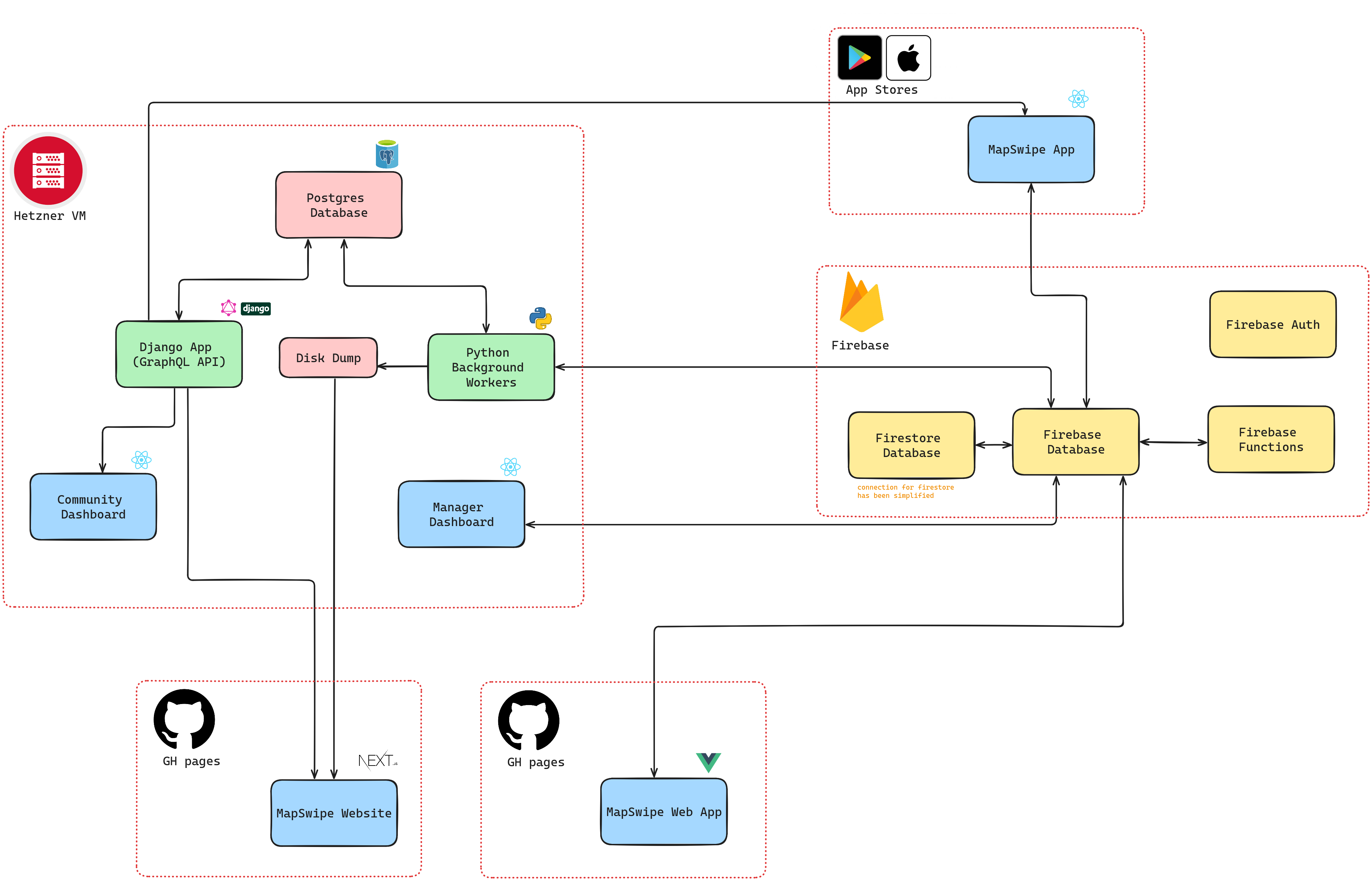
As shown in the diagram above, we had 2 different databases in the legacy system.
- Firebase: This acted as the primary database. It interfaced directly with the Manager Dashboard, Mobile App & Web App. It stored users, usergroups, draft projects, active projects (with tasks), user contributions, user swipe results (temporarily).
- Postgres: This acted as secondary and long-term database. It stored users, usergroups, draft projects, all projects (with tasks), all user swipe results.
The primary purpose for using firebase here was for auto-scaling in case of large number of submissions (potentially during the MapSwipe events).
Furthermore, A background worker periodically synchronized (partially) the 2 databases.
New Architecture
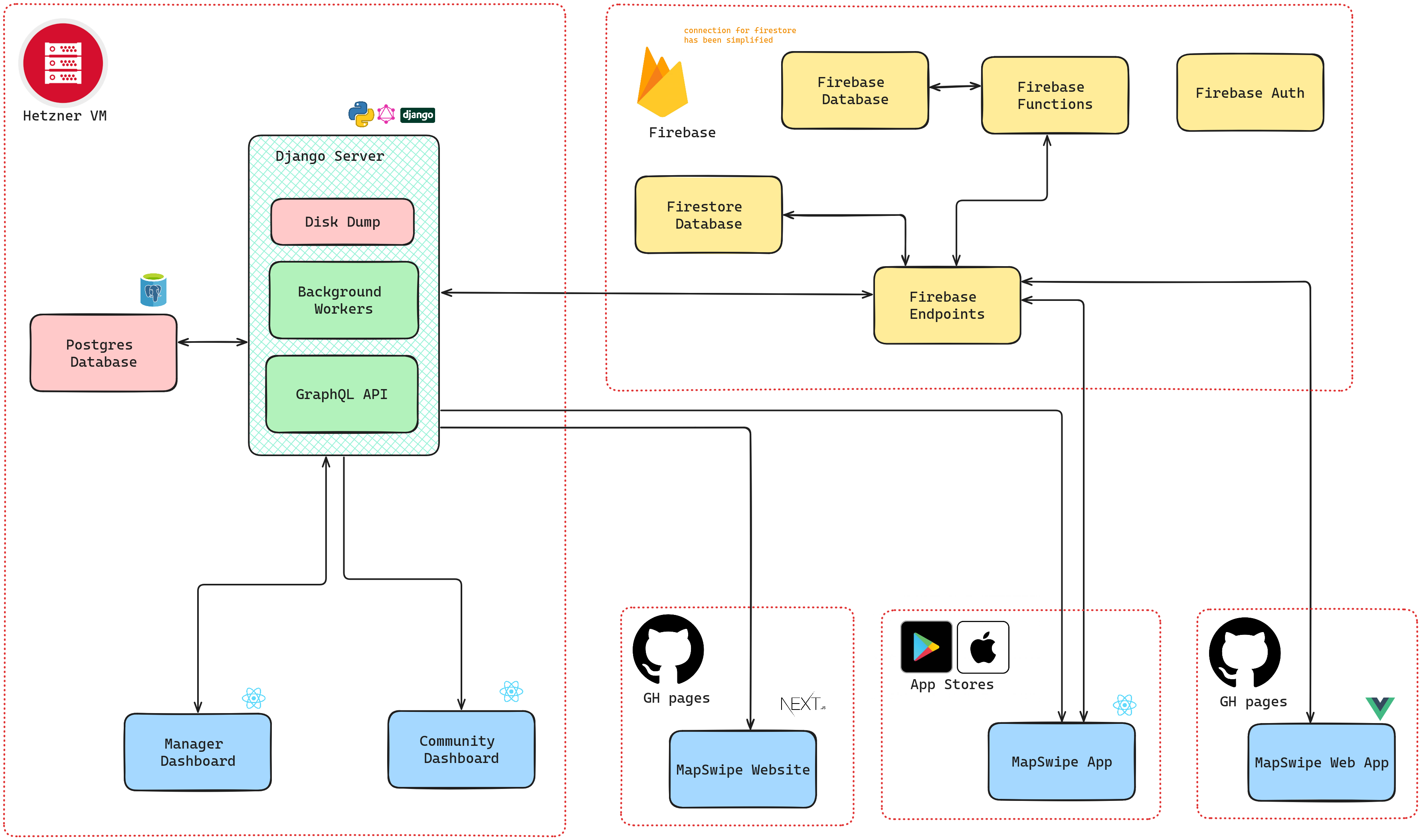
The major difference in this architecture is that, it uses Postgres as the primary database. Only MapSwipe mobile app and web app will interface with the Firebase directly. This way we'll still have scalable and reliable application while significantly reducing the usage of the Firebase database.
Components of the New Architecture:
- Python Backend: A robust Python-based backend that supports the Manager Dashboard.
- Django Server: A Django-based server that centralizes data management.
- Data Synchronization: Tasks and processes to sync data between Postgres and Firebase.
- REST API with Cloud Functions: Secure REST API endpoints managed via Google Cloud Functions.
- API-Driven Client Applications: Updated mobile and web applications utilizing the new API infrastructure.
Relations
MapSwipe Clients (Web App & Mobile App) - Firebase Realtime Database
- MapSwipe clients are requesting some
projects, data of a specificusers.userId. In case of a project selection a group (groups.projectId.groupId) and associated tasks (tasks.projectId.groupsId) will be requested - MapSwipe clients will only write to Firebase Realtime Database in case of result generation.
- MapSwipe clients are writing to
results.projectId.groupId.userId1.in form oftimestampandresultCountattributes when and how many results were generated. - The result itself will be written to
results.projectId.groupId.userId1.taskId1.result. - All of the results will be synced with backend and removed from Firebase at the end of the session
Manager Dashboard - Backend Database
- As compared to the old Manager Dashboard where users can submit new project drafts to Firebase (
project_drafts.projectDraftId.), users will now be able to complete the whole project creation journey from the Manager Dashboard without having to wait for Slack notification about successful creation notification or failed to create notification.
Community Dashboard - Aggregated Cached Data from Backend Database
- React based static server which uses Django webserver to show overall mapswipe aggregated contribution data.
MapSwipe Backend
- projectCreation:
- writes to
projects.projectId,groups.projectIdandtasks.projectIdin Firebase
- writes to
- transfer_results - Realtime Database
- requests
resultsfrom Realtime Database - deletes
resultsfrom Realtime Database
- requests
MapSwipe Backend - Postgres Database
- projectCreation - Postgres
- writes project, groups and tasks to Postgres database
- transfer_results - Postgres
- writes results to Postgres database
Django - Stats webserver
- aggregateStatData:
- requires user contribution related to user_group and project data from Postgres Database